Contents
- Echo server client
- Echo server client with multi-threading support
- Echo client with command line input (todo)
- Fibonacci series with command line input
- Word count of a text file
- Format example in print
- FTP program to transfer file (todo)
- monitor script on ifconfig tool (todo)
- Program to ask random questions from a question bank (todo)
- Script on calculator (bc tool) (todo)
- Script on netsnmp tool (todo)
Echo server and client program
Server programming with one client support at a time
#!/usr/bin/env python3
# File: echo-server.py

import socket

#HOST = '127.0.0.1'
HOST = ''
PORT = 56432


# with socket.socket(socket.AF_INET, socket.SOCK_STREAM) as s:
sock = socket.socket(socket.AF_INET, socket.SOCK_STREAM)
sock.bind((HOST, PORT))
sock.listen(1)
while True:
        print('Waiting to accpet a new connection')
        conn, addr = sock.accept()
        print('Connected by', addr)
        while True:
                data = conn.recv(1024)
                if not data:
                        break
                print('Received', repr(data))
                print('Echoing ...')
                conn.sendall(data)
        print('Closing the connection:', conn.getsockname(), conn.getpeername())
        conn.close()
sock.close()
Echo client with one send()
#!/usr/bin/env python3
# File: echo-client_v2.py

import socket

#HOST = '127.0.0.1'
HOST = '10.128.2.208'
PORT = 56433

s = socket.socket(socket.AF_INET, socket.SOCK_STREAM)
s.connect((HOST, PORT))
s.sendall(b'Hello, world')
data = s.recv(1024)
print('Received', repr(data))

s.close()
Server with multi-threading support
Echo server can support more than one connection at a time
#!/usr/bin/env python3
# File : echo-server_multithread.py

import socket

from _thread import *
import threading

print_lock = threading.Lock()

#thread function
def recv_func(c):
    while True:
        print_lock.acquire()
        print('[server-th]', threading.current_thread())
        print('[server-th]Waiting for data')
        print_lock.release()
        data = c.recv(1024)
        if not data:
            print_lock.acquire()
            print('[server-th] EOF: Closing the connection:', c.getsockname(), c.getpeername())
            print_lock.release()
            break

        print_lock.acquire()
        print('[server-th] Received', repr(data))
        print('[server-th] Echoing ...')
        print_lock.release()
        c.sendall(data)

    c.close()


def Main():
#HOST = '127.0.0.1'
    HOST = ''
    PORT = 56433


# with socket.socket(socket.AF_INET, socket.SOCK_STREAM) as s:
    sock = socket.socket(socket.AF_INET, socket.SOCK_STREAM)
    sock.bind((HOST, PORT))
    sock.listen(5)
    while True:
        print_lock.acquire()
        print('[Server] Waiting to accpet a new connection')
        print_lock.release()

        conn, addr = sock.accept()
        print_lock.acquire()
        print('[Server] Received connection from:', addr)
        print_lock.release()

        start_new_thread(recv_func, (conn,))

    print_lock.acquire()
    print('[Server] Closing server.')
    print_lock.release()
    sock.close()

if __name__ == '__main__':
    Main()
Client with multiple send()
#!/usr/bin/env python3

import socket
import time

#HOST = '127.0.0.1'
HOST = '10.128.2.208'
PORT = 56433

s = socket.socket(socket.AF_INET, socket.SOCK_STREAM)
s.connect((HOST, PORT))
counter = 0

while counter < 10:
        s.sendall(b'Hello, world: ')
        data = s.recv(1024)
        print('Received: ',counter,  repr(data))
        time.sleep(1)
        counter += 1

s.close()
Fibonacci series with CL input
#!/usr/bin/env python3
# File: fibonacci_test.py

def fibonacci_func(max):
        a, b = 0, 1

        while a < max:
                print(a, end=', ')
                a, b = b , a+b

def Main():
        max = int(input("How big Fibonacci series do you want? "))
        print(type(max))
        fibonacci_func(max)
        print(' end')

if __name__ == '__main__':
        Main()
Output
$ ./fibonacci_test.py
How big Fibonacci series do you want? 450
<class 'int'>
0, 1, 1, 2, 3, 5, 8, 13, 21, 34, 55, 89, 144, 233, 377,  end
Word count of a text file
#!/usr/bin/env python3

def file_op(c, dic):
        with open(c) as fp:
                for line in fp:
                        print(line)
                        words = line.split()
                        print('[word-count in the above line]', len(words))
                        print('Words', words)
                        for word in words:
                                if word not in dic:
                                        dic[word] = 1
                                else:
                                        count = dic[word]
                                        dic[word] = count + 1

def Main():
        #myfile = 'testfile.txt'
        myfile = input("Enter the filename: ")
        dic = dict()
        file_op(myfile, dic)
        print('Word count in the file \n\t : ', dic)

if __name__ == '__main__':
        Main()
Output
./work-with-file.py
Enter the filename: testfile.txt
This is a test file

[word-count in the above line] 5
Words ['This', 'is', 'a', 'test', 'file']
This has few lines

[word-count in the above line] 4
Words ['This', 'has', 'few', 'lines']
Count the lines and

[word-count in the above line] 4
Words ['Count', 'the', 'lines', 'and']
duplicate words.

[word-count in the above line] 2
Words ['duplicate', 'words.']
Word count in the file
         :  {'a': 1, 'Count': 1, 'and': 1, 'words.': 1, 'This': 2, 'is': 1, 'lines': 2, 'few': 1, 'duplicate': 1, 'file': 1, 'test': 1, 'the': 1, 'has': 1}
Format example in print
#!/usr/bin/env python3

def format_type1(r):
        for x in r:
                print('{0:2d} {1:3d} {2:4d}'.format(x, x*x, x*x*x))

def format_type2_up(m):
        o = 0
        for x in range(0, m+1):
                pos = m+1
                iter = (x*2)+1
                #print('x: {0}, pos: {1} , iter: {2}'.format(x, pos, iter))
                first = 1
                for y in range(0, iter):
                        if first == 1:
                                pos = pos - x
                                print(repr(o).rjust(pos), end='')
                                first = 0
                        else:
                                print('{0}'.format(o), end='')
                print()


def format_type2_down(m):
        o = 1
        for x in reversed(range(0, m+1)):
                pos = m+1
                iter = (x*2)+1
                #print('x: {0}, pos: {1} , iter: {2}'.format(x, pos, iter))
                first = 1
                for y in range(0, iter):
                        if first == 1:
                                pos = pos - x
                                print(repr(o).rjust(pos), end='')
                                first = 0
                        else:
                                print('{0}'.format(o), end='')
                print()

def Main():
        Mx = int(input("Enter size: "))
        print('Format:1 ')
        format_type1(range(1, Mx+1))
        print('Format:2 ')
        format_type2_up(Mx)
        print('Format:3 ')
        format_type2_down(Mx)

if __name__=='__main__':
        Main()
Output
./formatting-output.py
Enter size: 10
Format:1
 1   1    1
 2   4    8
 3   9   27
 4  16   64
 5  25  125
 6  36  216
 7  49  343
 8  64  512
 9  81  729
10 100 1000
Format:2
          0
         000
        00000
       0000000
      000000000
     00000000000
    0000000000000
   000000000000000
  00000000000000000
 0000000000000000000
000000000000000000000
Format:3
111111111111111111111
 1111111111111111111
  11111111111111111
   111111111111111
    1111111111111
     11111111111
      111111111
       1111111
        11111
         111
          1
Class example
#!/usr/bin/env python3

class Dog:

        def __init__(self, name):
                self.name = name
                self.tricks = []

        def add_trick(self, trick):
                self.tricks.append(trick)

def Main():
        name1= input("Enter name of dog1: ")
        name2= input("Enter name of dog2: ")

        d = Dog(name1)
        e = Dog(name2)

        d.add_trick('fast in jumping')
        e.add_trick('lazy')

        print('Tricks for {0}: {1},and  tricks for {2}: {3}'.format(d.name, d.tricks, e.name, e.tricks))

if __name__=='__main__':
        Main()
self, __init__, __call__
self: calling members of own class
__init__: constructor

class Foo:
    def __init__(self, a, b, c):
        # ...

x = Foo(1, 2, 3) # __init__

__call__: implements function call operator.
class Foo:
    def __call__(self, a, b, c):
        # ...

x = Foo()
x(1, 2, 3) # __call__
Super, Inheritance, multiple inheritance and MRO (method resolution order)
Refer : https://www.programiz.com/python-programming/methods/built-in/super
class Animal:
  def __init__(self, animalName):
    print(animalName, 'is an animal.');
class Mammal(Animal):
  def __init__(self, mammalName):
    print(mammalName, 'is a warm-blooded animal.')
    super().__init__(mammalName)

class NonWingedMammal(Mammal):
  def __init__(self, NonWingedMammalName):
    print(NonWingedMammalName, "can't fly.")
    super().__init__(NonWingedMammalName)
class NonMarineMammal(Mammal):
  def __init__(self, NonMarineMammalName):
    print(NonMarineMammalName, "can't swim.")
    super().__init__(NonMarineMammalName)
class Dog(NonMarineMammal, NonWingedMammal):
  def __init__(self):
    print('Dog has 4 legs.');
    super().__init__('Dog')

d = Dog()
print('')
bat = NonMarineMammal('Bat')
try, except, else and finally
https://www.w3schools.com/python/python_try_except.asp
try:
  print(x)
except NameError:
  print("Variable x is not defined")
except:
  print("Something else went wrong")
Python Libraries
Requests library
import requests

paga_name = requests.get('http://www.google.com')

print(paga_name)

///output
<Response [200]>
SciKit learn : to build a machine learning model
from sklearn import datasets, neighbors, linear_model

digits = datasets.load_digits()
X_digits = digits.data / digits.data.max()
y_digits = digits.target

n_samples = len(X_digits)

X_train = X_digits[:int(.9 * n_samples)]
y_train = y_digits[:int(.9 * n_samples)]
X_test = X_digits[int(.9 * n_samples):]
y_test = y_digits[int(.9 * n_samples):]

knn = neighbors.KNeighborsClassifier()
logistic = linear_model.LogisticRegression(solver='lbfgs', max_iter=1000,
                                           multi_class='multinomial')

print('KNN score: %f' % knn.fit(X_train, y_train).score(X_test, y_test))
print('LogisticRegression score: %f'
      % logistic.fit(X_train, y_train).score(X_test, y_test))

//output
KNN score: 0.961111
LogisticRegression score: 0.933333
import numpy as np
import matplotlib.pyplot as plt
from matplotlib.collections import LineCollection
from sklearn.linear_model import LinearRegression
from sklearn.isotonic import IsotonicRegression
from sklearn.utils import check_random_state
n = 100
x = np.arange(n)
rs = check_random_state(0)
y = rs.randint(-50, 50, size=(n,)) + 50. * np.log1p(np.arange(n))
# #############################################################################
# Fit IsotonicRegression and LinearRegression models
ir = IsotonicRegression()
y_ = ir.fit_transform(x, y)
lr = LinearRegression()
lr.fit(x[:, np.newaxis], y) # x needs to be 2d for LinearRegression
# #############################################################################
# Plot result
segments = [[[i, y[i]], [i, y_[i]]] for i in range(n)]
lc = LineCollection(segments, zorder=0)
lc.set_array(np.ones(len(y)))
lc.set_linewidths(np.full(n, 0.5))
fig = plt.figure()
plt.plot(x, y, 'r.', markersize=12)
plt.plot(x, y_, 'b.-', markersize=12)
plt.plot(x, lr.predict(x[:, np.newaxis]), 'b-')
plt.gca().add_collection(lc)
plt.legend(('Data', 'Isotonic Fit', 'Linear Fit'), loc='lower right')
plt.title('Isotonic regression')
plt.show()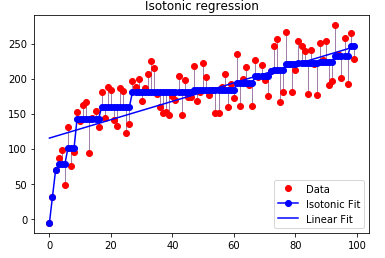

 SciTech News